
Sales Engagement Library
Ready to Use
Affarico has opened with the Sales Engagement Library, a focused collection of practical sales resources, templates, and example documents. Use this page to understand how the site is organized, how to find resources quickly, and how to access the materials included with your membership.
For the best resource access and use experience, Affarico is optimized for desktop viewing. Please revisit us on a device screen wider than 1000 pixels.
Start from the Home Page
The Affarico Home page is designed to make the primary purpose of the site simple to access from the moment you arrive. Instead of requiring users to navigate through several pages first, the main search, filter, and selection tools are available directly on the Home page.
The Home page acts as both the site introduction and the main entry point into the Affarico Sales Library. As new resources are added, you can return to the Home page to browse what is available, locate materials for a specific topic, and explore knowledge resources by area of immediate interest.

Search, Filter, and Open a Resource
From the Home page, you can search the available library content, sort resources by newest or oldest, and filter items by category, subcategory, title, or tags. This makes it easier to quickly find relevant sales knowledge, templates, examples, and planning resources without needing to understand the full site structure first.
After narrowing the results, select any library item card to open its individual resource page. Each item page provides a summary of the resource and, depending on your membership access, the available online viewing or download options.

Preview First, Subscribe to Access
Item summary information is available to all visitors, so you can open a library item page and review what the resource is about before logging in or subscribing.
To view or use the full resource content, an active Affarico membership is required. Signing up is simple, and once you have joined, you can log in from the site menu or directly from the access prompt shown on protected library resources. Full details of the available Affarico membership options can be found on the Pricing page.
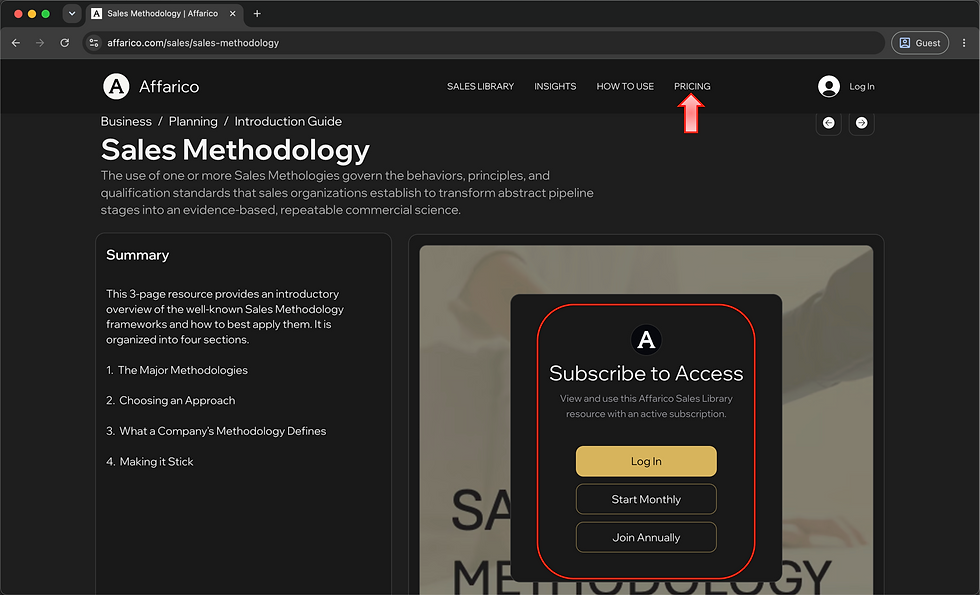
Choose a Membership Option
Review the available membership options and choose the one that best matches how you want to access and use the Affarico library. The monthly option provides online-only viewing access, while the annual option includes additional download entitlement for available documents, templates, and other library resources.
Once you have made your choice, click either the monthly or annual membership option to begin the sign-up process.

Start the Sign-Up Process
Account creation is the first step of the subscription process. To begin, select the indicated Sign Up button on the checkout page.
This allows you to create your Affarico account before continuing to the payment step and completing your selected membership subscription.

Create Your Affarico Account
Create your Affarico account by entering your first name, last name, email address, and a secure password. Your email address must be accurate so you can receive your subscription information and use it for future logins.
Once your details have been entered, select Submit to continue. The account creation process is secure, and your personal information is not shared. Your account is used to manage your membership access, allow you to log in, and provide access to the library resources included with your selected subscription.

Complete Checkout
After creating your account, continue to checkout to complete payment for your selected membership. Review the order summary to confirm that the membership information is clear and correct, then continue through the payment step to activate your Affarico subscription.
Once checkout is complete, your account will be linked to your selected membership plan, allowing you to log in and access the library resources included with your subscription.

Log In When You Return
After your subscription has been completed, accessing Affarico library resources is simple. Each time you return to the site and want to view or use member-only content, you only need to log in with the email address and password used to create your account.
Once logged in, your membership access will be recognized and the library resources included with your subscription will be available to use.

View and Use Library Resources
Once you are logged in, the resource content on library item pages becomes fully available for online viewing. Depending on the item, this may include PDF guides, Word documents, Excel workbooks, PowerPoint presentations, templates, examples, and other library materials.
Annual subscription members can also download available resource files for individual reading, editing, and practical use within their own organizations. This allows you to work with selected documents offline, adapt editable templates where appropriate, and apply the resources as part of your own planning, learning, and business activities.

Read Inline or Full Screen
Library resources can be viewed directly within the item page using the embedded online viewer. This allows you to read through the resource without leaving the page, while still keeping item summaries and related information visible nearby.
For a larger reading view, select the full screen toggle button in the viewer controls. This expands the resource into full screen mode, making it easier to read detailed pages, review longer documents, or present the material on a larger display.
A further benefit of the Affarico libraries is that you do not need to manage a large number of files on your local computer. The resources remain available online within the library whenever you need them.

Check Source and Use Details
Key details and reference information for each resource are collected at the bottom of the item page. This section provides supporting information about the resource, including source, access details, and any relevant notes about how the material can be viewed or used.
For third-party materials, this area also includes information about redistribution rights, use rights, and source locations where further information can be found. This helps you understand where the material comes from, how it may be used, and where to go for additional reference content.

Manage Your Subscription
Members can manage account details, subscription information, orders, notifications, and other membership settings from the member pages accessible through the header menu drop-down. After logging in, select the account icon in the site header to open the menu and choose the area you want to review or update.
The subscription page provides visibility of your current Affarico membership, including subscription status, payment details, previous payment activity, and upcoming renewal dates. This gives you a clear place to manage your subscription and keep your account information up to date.

Suggest a New Library Topic
We are continuously adding new content to the Sales Library, including example documents and reusable templates that can be downloaded for immediate practical use. The goal is to keep expanding the library with resources that help sales leaders, managers, and teams plan, engage, and execute more effectively.
We are always keen to hear what more could be added to make the library the best possible collection of resources for you and your organization. To suggest a topic, click the Suggest a Topic button link at the bottom of the Home page and complete the short submission form that follows.

Membership FAQs
Answers to frequently asked questions about Affarico membership can be found on the Pricing page. This includes information about subscription access, payment, cancellation, online viewing, and download entitlements.
We will keep the FAQ section updated as further common questions arise. You can also direct questions to us through the Affarico LinkedIn group or company pages, where we can respond and continue improving the guidance available to members and visitors.
